Gmail no longer accepts self signed certs for pop3/ssl

As six of December Gmail has ceased to accept self signed certs for pop3/ssl/tls I don’t really know why, the help url offered by them is http://support.google.com/mail/bin/answer.py?hl=en&answer=21291&ctx=gmail#strictSSL

Always use a secure connection (SSL) when retrieving mail

As of December 2012, Gmail uses «strict» SSL1 security. This means that we’ll always enforce that your other provider’s remote server has a valid SSL certificate. We made this change to offer a higher level of security to better protect your information.

What are the SSL certificate authority requirements?

We do not accept self-signed certificates. For a certificate to be valid it needs to chain up to a valid CA, like one in the Mozilla CA list.

So this means effective today I only check for mail on machines that are paying for a signed certificate from a recognized CA Authority meaning at this moment $$ and worse, no small amount, yes, there are some el cheapo providers, but again could happen that Gmail also don’t trust them… I just guessing what is going to do Dreamhost as they also use self signed certs, and by the way this will broke their offer for mail integration, and mos probably for a lot of SOHO users… and finally for myself as my set up for reading mail on the web is now totally messed up, maybe is time to return to use IMAP on Thunderbird for on the road reading… as on home I still use Thunderbird/pop3 for archiving and long term storage…

update: 14/12/2012 Google support forums had lots of threads talking about this, but two of them are getting real attention, cause affects a lot of schools & colleges[1], and also business users angry for not receiving notice to plan on beforehand [2].

[1] How can I force use of self-signed SSL certificate.
[2] Strict SSL – We could have been warned.

Publicado en Debraye, General, planetalinux, sysadmin, Web | 2 comentarios

Soledad y genero

El miedo a la soledad es un gran impedimento en la construcción de la autonomía, porque desde muy pequeñas y toda la vida se nos ha formado en el sentimiento de orfandad; porque se nos ha hecho profundamente dependientes de los demás y se nos ha hecho sentir que la soledad es negativa

Marcela Lagarde

Publicado en Debraye, Educación, General, Web | Deja un comentario

On new hard disk continued

Previously I wrote about getting and testing new disk one of the two ordered was sent to warranty the other was subject to stress test, well last Friday the faulty one was replaced with a new one from seller and begun stress test as this one replace one with less space used changed a little the script (BTW I found you can make spew do loops by itself after a second man page read, but I liked my script better).

#!/bin/bash
for a in $(seq 1 10);
do
for i in $(seq 1 1500);
do
spew  --raw -d -o 1m -b 16m 1g /home/F/spew/bigfile$i
echo $i
done
rm /home/F/spew/bigfile*
done
exit 0

And the results are:

And by now this is the disk that gets hotter of the bunch sdb, I thinking on changing places with sdd as its alone and also as its slower 5900RPM, and cooler than this last 7200RPM. At least by now looks like the stress test going fine…

Publicado en Debraye, General, planetalinux, sysadmin, Trabajo, Web | 2 comentarios

Regalo para…

En lo posible se pidió el permiso del autor original, como se notara los mensajes provienen del desaparecido CLUB BBS alojado mucho tiempo en el Instituto Tecnológico de Occidente (ITESO) situado temporalmente en los 90, en muchos casos no se recibió respuesta y de todas formas los pseudónimos ayudan a evitar problemas, también la distancia temporal.

El nom de guerre del autor en este texto, es Genma, cosa que no se ocultó o se explicitó en el texto original, pero que es necesario precisar para que el texto legal tenga sentido y para que el lector a la distancia sepa que partes son recopilación y cuales son creación propia, también baste decir fue un interesante juego de nombres, lectura y escritura.

La primera versión incluía diferentes estilos de letra entre ellas una manuscrita, posteriormente se cambió por Arial al equivocadamente considerarla libre, la versión actual usa la fuente libre Liberation Sans. El texto fue pensado para imprimirse a dos caras en papel tamaño carta, cosa difícil en la época en impresora de matriz de puntos, esta versión tiene un margen de 2 cm a ambos lados, 1 cm arriba y abajo, por lo cual es fácil si se requiere imprimirla por ambos lados de la hoja, no se incluyó espacio para encuadernación, pero está demostrado que funciona bien así, puesto que se encuaderno el impreso.

El nombre actual corresponde al nombre del archivo que se editó en la computadora al que se han añadido puntos suspensivos para sustituir el nombre de a quien estaba dirigido originalmente y que el autor desea obviar, al final funciona de mejor manera, con el subtítulo que fue agregado cuando se rescató esta compilación del disco duro donde estaba arrumbado, en el año 2012 y que el autor considera tiene mejor destino disponible en la red que relegado al olvido.

La primera y única edición impresa, tan solo incluía el empastado y el texto de la página 4 sin mayor explicación, ese empastado fue entregado el 29 de junio de 1998 a su destinatario original, la única réplica al mismo fue un par de meses después un papelito con respuesta a un verso del texto con seis palabras. lo que siguió como escribe otro autor, es otra historia y debe ser contada en otra ocasión.

http://blografia.net/vicm3/data/files/RegaloPara.pdf PDF 1.1MB
http://blografia.net/vicm3/data/files/RegaloPara.odt ODT 62KB

Víctor Manuel Martínez Martínez, primera versión junio 1998, segunda versión CC BY SA 2.5, 26 de noviembre de 2012, tercera versión, CC BY SA 4.0 9, 9 de septiembre de 2014. http://creativecommons.org/licenses/by-sa/4.0/deed.es

Publicado en Debraye, General, Sin categoría, Web | Deja un comentario

Queremos bakaradio

Y bien ya lo dije en Facebook, pero no imagino que muchos encuentren mi modificación de status, más allá de mi circulo social y limitado espacio de alcance, ¿por que no ponerlo en un lugar que se, tiene más lectores? Bueno eso estoy haciendo.

Dain, Ayu, Agus, Andy, Caronte los extrañamos y !nos gustaría saber de ustedes!

Publicado en Comic, Debraye, General, Web | 1 comentario

Nugget

2003-2012

Publicado en Debraye, General, Sin categoría | Deja un comentario

About new disks

I have the bad habit to put to test my new disks for 2 months before moving the original disk to storage and only after another 2 months move/sell/retire the old ones. Recently I buy 2 Seagate Barracuda ST2000DM001 @7200RPM, one is going directly to warranty as never can finish even format, ‘cause of bad sector count and UDMA timeouts.

Well as the primary use for this two disk where to replace two older IDE Seagate Disks ST3320620A 320GB @7200RPM, after copying all the old data, I had a lot of free space to test, and after the fiasco with the first disk I wanted to stress this one.

I searched for tools to test the I/O and stress disk, found spew and iozone both very useful, by the way if you want nice graphs and benchmarks go for iozone, but I needed to create arbitrary files of random data and test write and read accuracy, so I tried spew, first filling what free space was left on each partition of the drive… but as you maybe guessing that after the first test is the same pattern and wanted also to try with smaller files, ended making a small script

#!/bin/bash
for a in $(seq 20);
do
for i in $(seq 1 100);
do
spew  --raw -d -o 1m -b 16m 1g /home/D/spew/bigfile$i
spew  --raw -d -o 1m -b 16m 1g /home/E/spew/bigfile$i
echo $i
done
rm /home/E/spew/bigfile*
rm /home/D/spew/bigfile*
done
exit 0

Also as I’m lazy i running it on screen to let it run for a while and let munin to the graphs and systat to collect I/O usage, also I’m running with the next line:

time sh testdisk.sh 2&>1 >> test.log

So it creates 100GB of files one by one, 20 times… the first run not finished as we had a power outage, but I going to try this for a week or at least until next tuesday that is when I have time to send the other disk to warranty, and if this one fails google’s paper says is going to be sooner than later (at least I hope so).

And by first hand experience a burn test (stress test) serves to show bad components earlier…

Update 15/11/2012
Why change the behavior of spew and not only create a BIG files?, well I wanted sustained stress, and with the cycle, of writing the big file, then checking then deleting I was not what I wanted, so the change of creating»smaller» files, to create sustained activity.

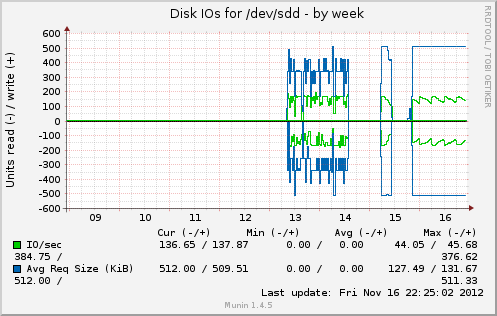
On the image you can see 13-14 the workload of creating, checking and delete big files. 15, the new pattern of smaller files until power outage. And since last night the new pattern, more like I was attempting.

Publicado en Debraye, General, planetalinux, sysadmin, Web | Deja un comentario

Easy way to enconde video for set top box

If you had one of these every day more affordable and really cheap mitzui and others DVD players that also reproduce vidx and xvid video and read USB sticks/Memory Cards, but not MP4 with AC3. Sure you want to be able to reproduce without have to burn a CD with something like nero or similar to convert between formats.

I tried ffmpeg on Debian and found some interesting things:

  1. Build lacks MP3 sound codec, cause patent problems on several countries
  2. Also DivX is not included as is commercially owned and the legal of this is not gray but more like black so not included (even when its a implementation of H264/MPEG-4VC, same or worse problem for DivX ;) (MPEG-4 version 3)
  3. Strange enough never can make Xvid output, I found this is because patent issues on several countries…

So even transforming to AVI, Indeo/M$/H264/MPEG-4, the audio where in mp2 or AC as cant make use of liblame without make a mess o compile my own ffmpeg.

In any case the magic incantation to get what I need was:

ffmpeg -i movie.mp4 -vcodec xvid -acodec mp3 movie.avi

This is cause before I have done a really big file with MPEG-1 video and mp2 sound (terrible if you wonder), to just found that my decoder reads well, but don’t support external subtitles on mpg files :( bummer.

Finally found that even in win you can use ffmpeg for free with WinFF (that regardless of the name runs on Linux and Win) [1] that gives nice menus and combos, yes I know that for win exist a monstrous encoder called Super [2] but that thing is really big, useful when you need  FFmpeg , MEncoder , MPlayer , x264 , MusePack (mpc) , Monkey’s Audio (ape) ,Shorten Audio (shn) , Tom’s Audio Kompressor (tak) , True Audio (tta) , WavPack (wv) ,libavcodec library (compiled inside FFmpeg and MEncoder) & the theora/vorbis RealProducer’s plugIn… but normally FFmpeg is just enough.

By the way searching for info I reached 19 ffmpeg commands for all needs [3] that gives you a very good cheat sheet and examples of how craft ffmpeg switches and options.

[1] http://winff.org/html_new/
[2] http://www.erightsoft.com/SUPER.html
[3] http://www.catswhocode.com/blog/19-ffmpeg-commands-for-all-needs

Publicado en Debraye, planetalinux, sysadmin, Web | Deja un comentario

Webalizer for no system logs

Last month we requested a report from IT department, we expected nice charts, averages, max request, minimum, peak hours / days / weeks, month. What we got was a nice 65MB RTF file with a copy & paste of Apache access.log.

As professors my colleagues where outraged to say the least, «how are supposed to get any sense from this data?», well I just take a copy on my USB stick, as we where handled a full CD to give us the info.

As on 2006 I maintained a site for political discussion, with really big traffic, this short of analysis was no unknow to me, I know there are better tools for the job, but one fast, great and that you can use straight from CLI its webalizer, so I checked still was installed on my system, re-read some of the switches help and after like 4 attempts ended firing something like:

webalizer Bigreport.log -v -i -j -b -T -n http://fu.bar/ -D.cache -N 5 -o tmp/

As you may notice first saved the RTF file to plain text just to be on the safe side.

And voila!, we have better insight from the data… but next time, I just going to plain ask for a full backup of the site, DB and logs.

Publicado en General, planetalinux, sysadmin, Web | Deja un comentario

How To Create Bootable USB Disk For Seagate SeaTools

This entry originally was named «Seatools boot from usb stick», but as I searched on google, results with bad to worse methods to create bootable usb sticks are up in place, so I changed the name in hope that gets more visibility on the net.

Recently I need to use the seagatetools for DOS to diagnose a HDD, to get a RMA for warranty replacement, as my new drive came with several damaged sectors (in fact I can’t even format without getting DMA, and other errors… yes I changed cable, drive, and mobo, so it’s the drive), but there were only two options, available for download, one are a windows download, that requires NET4 framework and obviously Windows, and I don’t have neither at  hand, and the other DOS (FreeDOS) image, I wanted to use the last one, but also don’t have a CD ROM on my machine, so after go crazy, and screamed some curses, searched for the documentation, and it’s really bad documented how to use on anything different than a CD, you can boot freedos with syslinux, but that it’s not for the faint of hearth or easy is also tricky, that at the moment where working from my netbook doesn’t help either [1], update: finally found how to make this from linux, also easy and without that much hassle [2]) I found in some other post a really easy way to make this work using YUMI, this is preferred faster and easier (need windows or wine). This also probably works with unetbootin [3], but not have tested.

I finally get bored and unpacked a old portable USB DVD ROM I had, but the logs of seatools can’t be written easily to other media (no floppy, no other drive, well other but with EXT4 and no fat or VFAT partition). But using a USB stick you can copy directly to disk and do a lot more that undust that old CD RW disc…

by Ramesh Balakrishnan on Mon, 08/06/2012 – 12:30.

GO to http://www.seagate.com/support/downloads/seatools/# and download seatools for DOS and

save the ISO on your hard disk

1)Download YUMI multiboot [3]
2)run YUMI by doubleclicking on it
3) Click on I AGREE
4) Select the drive letter
5)In the box below go to option try an unlisted ISO( boot from Ram)
6. On the box below click browse and give the path to your saved ISO file
7. click CREATE.

thats all . All you have to do is boot from USB and start using the utility.
If in case you have any problem in booting

then download HP usb format tool from
http://www.softpedia.com/get/System/Hard-Disk-Utils/HP-USB-Disk-Storage-Format-Tool.shtml

Format your usb– Uncheck quick format and do a full format( might take some time)

Repeat 1 thro 7. and boot from USB .It should work now !

This worked for me after some sleep and after doing some googling found that is not by far the first response nor a prominent one, so for the record and for kept where I can found fast if I need again, I repost here the insightful comment [5]. Also I got a replacement for my drive within a week after sending along with RMA data.

[1] http://ubuntuforums.org/showthread.php?t=1333956
[2] https://github.com/iiska/bootstick
[3] https://unetbootin.github.io/
[4] http://www.pendrivelinux.com/yumi-multiboot-usb-creator/
[5] http://www.megaleecher.net/Seagate_SeaTools_For_DOS_Bootable_USB_Maker_Kit#comment-38392

Publicado en General, planetalinux, sysadmin, Trabajo | Etiquetado , , , , | 3 comentarios